Mastering Floral Alphabet Monogram SVG Sublimation for Professional Results
The rise of personalized home decor and custom apparel has made digital design assets more valuable than ever. Among the most versatile tools in a creator’s arsenal is the Floral Alphabet Monogram SVG Sublimation file. These designs blend elegant typography with intricate botanical elements, offering a sophisticated aesthetic that appeals to a wide demographic. However, possessing the file is only half the battle. Many creators, from hobbyists to small business owners, stumble not because they lack talent, but because they overlook critical technical details regarding file usage, material compatibility, and resolution requirements.
Understanding the nuances of these digital assets can save you hours of frustration and prevent wasted materials. Whether you are using a Cricut, Silhouette, Cameo, or a laser cutter, the difference between a amateur-looking product and a professional-grade item often lies in how well you understand the source files. This guide addresses common pitfalls and provides actionable advice to ensure your projects meet high standards.
The Misconception of "One Size Fits All" File Formats
A frequent mistake beginners make is assuming that all vector and image files function identically across different platforms. When you purchase a bundle containing PNG, SVG, and EPS files, each format serves a distinct purpose. Using the wrong one for your specific machine or project type is a primary cause of poor output quality.
For instance, many users attempt to use the PNG Transparent 300dpi files for vinyl cutting. This is a fundamental error. PNGs are raster images, meaning they are made of pixels. Cutting machines require vector paths to determine where the blade should move. If you load a PNG into your cutting software without proper tracing, you risk jagged edges, missed cuts, or excessive node points that slow down your machine. Conversely, using an SVG for sublimation printing without checking the color profile can lead to dull or inaccurate colors on the final substrate.
The Better Approach: Always match the file format to the task. Use SVG or EPS files for any project involving cutting machines like Cricut or Silhouette. These vector formats scale infinitely without losing quality, ensuring smooth curves in those delicate floral petals. Reserve the high-resolution PNG files for sublimation printing, web design, or direct-to-garment applications where pixel-based imagery is required. Before starting, verify that your software supports the specific vector format you intend to use.
Overlooking Material Compatibility and Design Complexity
Floral alphabet monograms are inherently detailed. The intertwining leaves and flowers around the letters create a beautiful visual, but this complexity poses challenges when working with certain materials. A common oversight is attempting to cut intricate floral SVGs from thick or brittle materials like heavy cardstock or certain types of wood without adjusting settings or expectations.
When using paper or vinyl, fine details can tear or weed poorly if the design is too complex for the material’s durability. For laser cutting wood, intricate floral patterns may burn excessively or take an impractical amount of time, driving up production costs. Ignoring these physical limitations leads to wasted supplies and disappointed customers.
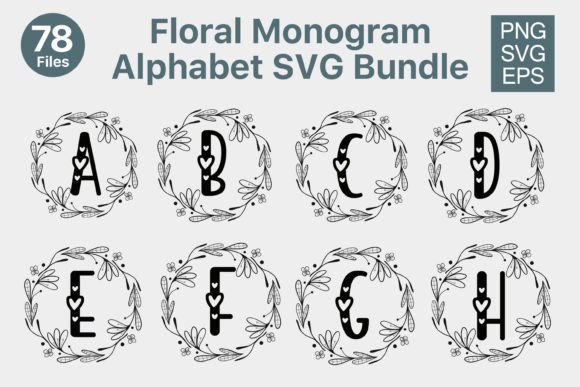
Practical Advice: Test your design on scrap material first. If you are working with vinyl, consider simplifying the design by removing the smallest interior details that are difficult to weed. For wood or acrylic laser cutting, ensure the lines are thick enough to withstand the laser beam without disappearing. If you are using the Floral Alphabet Monogram SVG Bundle 26 Designs, choose simpler letters for tougher materials and reserve the most intricate designs for smooth, forgiving surfaces like HTV (Heat Transfer Vinyl) or sublimation blanks.
Neglecting Resolution and Scaling Issues
While vector files like SVG and EPS are scalable, the accompanying PNG files are not. A significant error occurs when users enlarge a PNG beyond its intended dimensions. Since the provided files are 300dpi, they are high quality for standard prints. However, stretching them for large-format banners or oversized wall art will result in pixelation and blurriness.
This issue also affects sublimation. If you resize a raster image incorrectly in your design software, you may inadvertently lower the effective DPI, leading to a fuzzy print on your mug or t-shirt. Furthermore, some creators forget to check the aspect ratio, distorting the elegant proportions of the floral monogram.
How to Avoid This: Always check the dimensions of your PNG files before placing them in your design canvas. If you need a larger size, return to the SVG or EPS file, resize it there, and then export a new PNG at the required dimensions and 300dpi. This ensures crisp edges and clear details regardless of the final size. For web use, you can export at 72dpi to keep file sizes manageable, but always keep the 300dpi master for print.
Ignoring Licensing and Commercial Use Rights
Perhaps the most critical yet overlooked aspect of downloading digital assets is understanding the license. Many creators assume that purchasing a bundle grants them unlimited rights to use the designs in any way. While most bundles allow for commercial use on physical products, restrictions often apply to digital resale. You typically cannot resell the SVG files themselves or use them to create competing digital products.
Failing to read the license agreement can lead to copyright strikes, account suspensions on marketplaces like Etsy, or legal issues. It is essential to know exactly what you are allowed to do with the Floral Alphabet Monogram SVG Sublimation files.
Best Practice: Read the included license document carefully. Generally, you can use these designs to create physical items for sale, such as shirts, mugs, or signs. However, do not upload the raw SVG files to print-on-demand sites that sell digital downloads. If you are unsure, contact the designer for clarification. Protecting your business starts with respecting intellectual property rights.
Preparation Checklist for Seamless Workflow
To ensure efficiency and quality, adopt a systematic approach before you begin cutting or printing. Here is a quick checklist to streamline your process:
- Unzip and Organize: Immediately extract the ZIP file contents into a dedicated folder. Keep the PNG, SVG, and EPS files organized so you can locate them quickly.
- Inspect the Vectors: Open the SVG in your design software to check for any stray nodes or open paths that might cause cutting errors.
- Verify Transparency: Ensure the PNG backgrounds are truly transparent, especially if layering multiple elements.
- Test Cut/Print: Always run a small test on scrap material to calibrate pressure, speed, and temperature settings.
- Backup Your Files: Store a copy of the original bundle in cloud storage to prevent data loss.
By paying attention to these details, you transform a simple digital download into a powerful tool for your creative business. The Floral Alphabet Monogram SVG Bundle 26 Designs Each offers immense versatility, but its value is fully realized only when used with precision and knowledge. Avoid the common traps of format mismatch, material incompatibility, and licensing ignorance. Instead, focus on leveraging the high-quality nature of these files to produce standout DIY crafts and professional products. With the right approach, your workflow will become smoother, your waste will decrease, and your final results will consistently impress your audience.