Integrating Brown Paper Texture Cardboard Background into Professional Design Workflows
In the landscape of digital design and physical print production, texture serves as a critical bridge between flat visuals and tactile reality. The Brown Paper Texture Cardboard Background is not merely an aesthetic choice; it is a functional asset that grounds designs in authenticity. For professionals ranging from brand strategists to independent creators, understanding how to effectively deploy these assets can significantly elevate the perceived quality of a project. This article explores the practical integration of high-resolution brown paper textures into various workflows, focusing on preparation, execution, and long-term asset management.
The Strategic Value of Textured Foundations
Before diving into technical implementation, it is essential to understand where textured backgrounds fit within a broader creative process. In modern marketing and design, minimalism often risks feeling sterile or impersonal. Introducing a Brown Paper Texture Cardboard Background adds warmth, organic imperfection, and a sense of sustainability to visual communications. This is particularly relevant for brands emphasizing eco-friendly practices, artisanal quality, or rustic aesthetics.
These textures function as a foundational layer. They interact with foreground elements—such as typography, product mockups, or illustrations—to create depth. When used correctly, they guide the viewer’s eye and provide a cohesive context for disparate design elements. Whether you are designing a website banner, a social media post, or a physical packaging prototype, the background sets the tonal stage before any other decision is made.
Technical Specifications and Quality Control
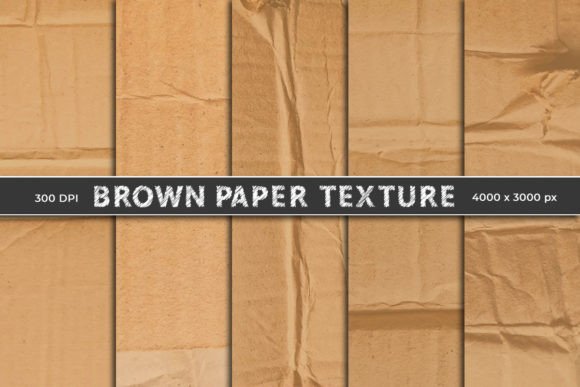
The efficacy of any digital asset depends heavily on its technical quality. The pack discussed here includes five unique compositions, each sized at 4000 x 3000 pixels with a resolution of 300 DPI. These specifications are crucial for two primary reasons: flexibility and print readiness.
- High Resolution: At 300 DPI, these files are suitable for high-quality printing. This allows designers to use the same asset for both digital banners and physical materials like business cards, posters, or packaging inserts without loss of clarity.
- Large Dimensions: The 4000 x 3000 pixel size provides ample room for cropping and scaling. Designers can isolate specific creased areas or smooth sections to match the composition needs of different projects.
- JPEG Format: While PNGs support transparency, JPEGs are universally compatible and offer smaller file sizes for web use, provided the compression artifacts are minimal. At this resolution, the detail retention is sufficient for most professional applications.
When integrating these files into your workflow, always verify the color profile. Most stock textures come in sRGB, which is ideal for web display. If you are preparing files for professional offset printing, ensure you convert them to CMYK in your software of choice to avoid color shifts in the brown tones.
Workflow Integration: From Concept to Final Output
Implementing a Brown Paper Texture Cardboard Background requires a structured approach to ensure it enhances rather than overwhelms the design. Below is a practical breakdown of how these assets interact with common tools and processes.
Preparation and Organization
Efficiency begins with organization. Upon purchasing the pack, create a dedicated folder in your digital asset management system. Label the files clearly based on their visual characteristics—for example, "Heavy Crease," "Smooth Kraft," or "Torn Edge." This categorization saves time during the creative phase, allowing you to select the appropriate texture based on the mood of the project rather than browsing through unnamed files.
Implementation in Adobe Photoshop
For users working in Photoshop, the workflow involves layering and blending modes. Start by placing the JPEG file as the bottom layer of your document. To integrate foreground elements seamlessly, utilize clipping masks and layer styles.
- Place the Texture: Drag the 4000 x 3000px JPEG into your canvas. Scale it to fit, ensuring you maintain the aspect ratio to prevent distortion of the paper grain.
- Adjust Blending Modes: If you are overlaying text or graphics, experiment with blending modes such as Multiply or Overlay on the foreground layers. This allows the texture to show through the colors, creating a unified look.
- Use Clipping Masks: For product mockups, place your product image above the texture layer. Right-click the product layer and select "Create Clipping Mask." This confines the product visibility to the shape of the layer below, or conversely, allows you to mask the texture onto specific shapes.
- Refine with Opacity: Rarely should a texture be at 100% opacity if it competes with readable text. Lower the opacity of the texture layer to 20-40% to soften the visual noise while retaining the tactile feel.
Utilization in Canva and Web-Based Tools
Not all creators work in complex desktop software. For marketers and small business owners using platforms like Canva, the process is streamlined but still requires attention to detail. Upload the high-resolution JPEGs to your brand kit. When building a design, set the brown paper image as the background. Use the "Transparency" slider to reduce intensity if the text becomes hard to read. Canva’s element library can then be used to add overlays, such as tape strips or handwritten notes, which complement the cardboard aesthetic naturally.
Use Cases Across Industries
The versatility of the Brown Paper Texture Cardboard Background allows it to serve diverse industries. Understanding these applications helps in planning its use within specific project timelines.
Branding and Identity
For brands focusing on sustainability or artisanal craftsmanship, these textures are invaluable. They can be used in brand guidelines to define the visual language of packaging, stationery, and promotional materials. Consistency is key; using the same texture family across touchpoints reinforces brand recognition.
Digital Marketing and Social Media
In social media feeds, textured backgrounds stop the scroll by offering a break from glossy, hyper-polished imagery. They are ideal for quote graphics, product announcements, and behind-the-scenes content. The creased compositions add a sense of immediacy and authenticity, suggesting a "work in progress" or handmade vibe that resonates with modern audiences.
Print Templates and Scrapbooking
For educators, hobbyists, and publishers, these files serve as excellent bases for print templates. Whether creating junk journals, scrapbooks, or educational worksheets, the high DPI ensures that printed outputs remain crisp. The unique creases provide natural dividing lines or areas for text placement, reducing the need for additional graphic elements.
Best Practices for Long-Term Usability
To maximize the return on investment for this digital paper pack, consider the following best practices:
- Non-Destructive Editing: Always keep the original texture layer intact. Use adjustment layers for brightness, contrast, or color balance. This allows you to revert changes or adapt the texture for different projects without degrading the source file.
- Contrast Management: Brown paper is mid-tone. Ensure your foreground elements have sufficient contrast. Dark text may get lost in darker creases, while light text may disappear in highlighted areas. Use drop shadows or solid backing boxes if readability is compromised.
- Contextual Relevance: Do not force the texture into every project. It works best for organic, rustic, or vintage themes. For corporate, tech-focused, or ultra-modern designs, it may clash with the intended message. Evaluate the brand voice before application.
- File Archiving: Keep the original JPEGs in a cloud-backed storage solution. As design trends cycle, the demand for authentic, tactile textures remains consistent. Having easy access to these assets ensures you can quickly respond to client requests for rustic or eco-friendly designs.
Conclusion
The Brown Paper Texture Cardboard Background is more than a decorative element; it is a strategic tool for enhancing visual communication. By understanding its technical specifications, integrating it smoothly into software workflows like Photoshop and Canva, and applying it with intentionality, creators can produce work that feels both professional and authentically human. Whether for digital banners, print templates, or branding materials, these high-resolution assets offer the flexibility and quality needed to meet rigorous professional standards. Proper organization and non-destructive editing practices ensure that these textures remain valuable resources in your design toolkit for years to come.